
Choose the license that best fits your workflow.
Start with what you need now, and upgrade as your production scales. All licenses are one-time purchases — no subscription required.
CyanView licenses cover the following three types of devices.
Both versions are available at every license tier. The difference is the hardware.
| Feature | RCP | RCP-J |
|---|---|---|
| Touchscreen + rotary knobs | ✔ | ✔ |
| Access to scene file menu | ✔ | ✔ |
| Quick scene buttons (1–5) | — | ✔ |
| Integrated iris joystick | — | ✔ |
The standard RCP provides full camera control via touchscreen and rotary knobs. Scene files are accessible through the menu system.
Choose RCP when: scene files are set once and rarely change during production.
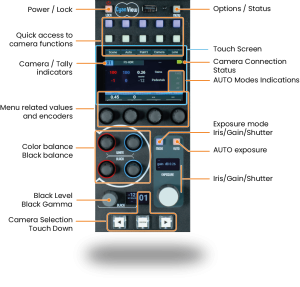
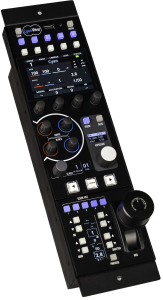
RCP-J adds five quick-access scene buttons and an integrated iris joystick on top of the RCP.
Choose RCP-J when: you need instant access to preset looks during live production.
The license tier determines how many cameras a single RCP can control simultaneously.
| License Tier | Cameras Controlled |
|---|---|
| DUO | 2 |
| QUATTRO | 4 |
| OCTO | 8 |
| MSU | Unlimited |
Included in every plan:
You can upgrade to a higher tier at any time. Upgrades are applied via a license file, so no hardware changes are required.
For upgrade options, please contact us.
RIO (Remote I/O) enables remote camera control. Choose +LAN or +WAN based on your need for local vs. external connectivity and the number of connected cameras.
| License | Cameras Controlled | LAN | WAN / Cloud |
|---|---|---|---|
| +LAN | 1–2 | ✔ | — |
| +WAN | 1–128 | ✔ | ✔ |
Controls up to 2 cameras on a local network.
Includes:
Limitations:
Enables remote camera control both locally and via the cloud.
Includes everything in +LAN, plus the following.
 How cloud connectivity works
CyanView Cloud lets you shade and control any camera from anywhere, using nothing but an internet connection.
An RCP in the control room and a RIO connected to a camera can operate exactly as they would on a local network, even when separated by great distances – such as during a marathon broadcast – as long as both have internet access. Each device connects through CyanView’s cloud servers, so no complex network configuration (such as firewall changes) is needed. Devices recognize and connect to one another using a group tag (REMI group name).
A RIO +LAN license can be upgraded to +WAN at any time.
*Upgrades are performed via the Web UI, so no hardware changes are required.
The CI0 (Camera Interface) is a serial-to-IP converter that connects a camera to the network. It operates as a slave device controlled by an RCP or RIO.
Key points:
CI0 vs. RIO for remote connections
If you need reliable camera control in locations with unstable network connectivity, use RIO rather than CI0. RIO maintains local control even if the network connection drops; CI0 cannot.
